

Introduction
Google Pixel Camera Lens Protection is important for anyone who wants to maintain excellent photo quality and keep their smartphone camera in good condition. Google Pixel phones are known for their photography capabilities, offering detailed images, impressive low-light performance, and useful computational photography features. However, even a powerful camera can produce disappointing results if its lenses become scratched, dirty, or damaged.
The camera area on a smartphone is exposed to everyday risks. Placing your phone on rough surfaces, carrying it in a pocket with keys, or accidentally dropping it can damage the camera glass or surrounding components. Dust, fingerprints, and oily marks can also interfere with image clarity, causing unwanted reflections, haze, or blurry photographs.
Fortunately, protecting your Pixel camera does not require complicated equipment. Using a suitable phone case, cleaning the lenses correctly, choosing accessories carefully, and following a few practical habits can reduce the risk of damage. Understanding how camera protection works will also help you avoid accessories that interfere with photography or create unnecessary problems.
1. Why Google Pixel Camera Lens Protection Matters
A smartphone camera lens is a small but important part of the device. The protective glass covering the camera helps shield delicate optical components from everyday contact, while the camera system captures the light needed to create photographs and videos.
Although camera glass is designed for regular use, it is not completely immune to scratches, cracks, or impact damage. Small particles of sand and other abrasive materials can cause damage when pressed against the camera area. Repeated contact with rough surfaces may also leave marks over time.
Protect Photo and Video Quality
Clean, undamaged camera glass helps light reach the camera sensors as intended. Fingerprints, oily residue, and dust can scatter light and reduce contrast. In bright sunlight or nighttime scenes, dirty glass may produce unwanted glare or hazy areas.
Scratches and cracks can create more persistent image problems. Depending on their location and severity, they may affect sharpness, introduce reflections, or interfere with the appearance of certain photographs.
Keeping the camera area clean and protected helps preserve consistent image quality. It also reduces the likelihood of needing an expensive repair.
Prevent Accidental Physical Damage
Your Pixel camera can be exposed to hazards when you place the phone on a desk, slide it into a bag, or carry it in your pocket. Small objects may rub against the camera glass, while an accidental drop can damage the camera assembly.
A protective case with a raised camera border can help reduce direct contact between the lenses and flat surfaces. It may also provide additional cushioning during minor impacts, although no case can guarantee protection against every drop.
Maintain Your Phone’s Long-Term Value
A phone in good physical condition is generally easier to maintain and may be more attractive to future buyers or trade-in services. Scratches, cracked camera glass, and visible damage can affect its appearance and potentially its resale value.
Preventive care is often simpler than arranging repairs. A practical protection setup can help you avoid unnecessary costs while keeping your Pixel ready for everyday photography.
2. Choose the Right Google Pixel Camera Protection Accessories
The best protection depends on your Pixel model, how you use your phone, and the environments where you take photographs. A suitable case is often the most useful starting point, while lens protectors may provide an additional layer of defense.
Use a Case With a Raised Camera Border
A case with a raised edge around the camera bar or camera lenses helps keep the glass from directly touching flat surfaces when the phone is placed on a table.
Look for a case specifically designed for your Pixel model. Camera layouts differ between generations, so a case intended for another device may not align correctly with the lenses, flash, or microphone openings.
Choose materials that provide a secure grip and enough cushioning for your daily activities. Flexible materials, reinforced corners, and a well-fitted camera surround can all contribute to practical protection.
However, avoid cases that obstruct the camera lenses or flash. Even a small obstruction may interfere with photographs, especially when using the flash in low-light conditions.
Consider a Camera Lens Protector
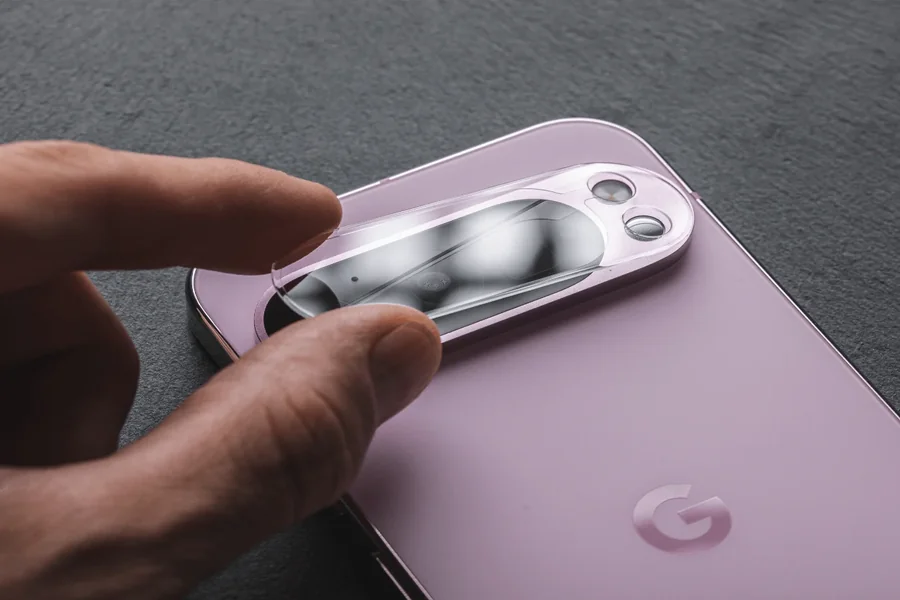
Camera lens protectors are typically made from glass or another transparent material designed to cover the camera area. They may help protect against scratches caused by everyday contact.
Before buying one, confirm that it is compatible with your exact Pixel model. Check its dimensions, installation method, material quality, and compatibility with your existing case.
Quality matters because an unsuitable protector may introduce reflections, reduce contrast, attract fingerprints, or interfere with the flash. Some designs cover the entire camera bar, while others protect individual lenses.
A protector is an optional accessory rather than a necessity for every user. If you choose one, prioritize optical clarity and a precise fit over decorative features or unusually low prices.
Avoid Low-Quality Accessories
Poorly manufactured protectors may have uneven adhesive, inaccurate cutouts, or coatings that make cleaning difficult. These issues can affect usability even when the accessory appears clear.
Read product specifications and user feedback before purchasing. Look for information about compatibility with your particular phone, photo quality, installation, and removal.
If a protector produces persistent haze, glare, or unusual reflections, remove it carefully according to its instructions and test the camera again. If image problems continue, inspect the original camera glass for dirt or damage.
3. Clean Your Google Pixel Camera Lens Correctly
Regular cleaning is one of the easiest ways to maintain camera performance. Fingerprints and dust can accumulate even when your phone has a protective case or lens cover.
Use a Soft Microfiber Cloth
A clean microfiber cloth is generally suitable for removing fingerprints and light dust from camera glass. Gently wipe the camera area using small movements without applying excessive pressure.
Avoid using rough tissues, clothing with abrasive particles, or paper products that may leave residue. Never scrub the lens aggressively in an attempt to remove a stubborn mark.
If you have been outdoors, inspect the camera area for sand or grit before wiping it. Rubbing abrasive particles across the glass can cause scratches.
Avoid Harsh Cleaning Chemicals
Do not spray cleaning liquid directly onto your phone. Avoid household cleaners, abrasive products, and other substances that are not approved for your device.
If additional cleaning is necessary, follow Google’s current cleaning guidance for your specific Pixel model. Use only recommended materials and ensure that liquids do not enter the camera assembly, charging port, or other openings.
If your phone has a lens protector, follow the accessory manufacturer’s cleaning instructions as well. Some coatings may respond differently to cleaning products than the original camera glass.
Check the Camera Before Important Photos
Make lens inspection a quick habit before taking important photographs. This is especially useful when photographing landscapes, family events, pets, or subjects in low-light conditions.
If images look unexpectedly blurry or hazy, clean the camera glass first. Then take a test photograph to determine whether the issue has improved.
Remember that not every image problem comes from dirty glass. Focus errors, motion blur, lighting conditions, software processing, and camera settings can also affect results.
4. Everyday Habits That Keep Your Pixel Camera Safe
Accessories help, but your daily handling habits also play a major role in camera protection. Small changes can reduce unnecessary contact with abrasive surfaces and lower the risk of accidental damage.
Store Your Phone Carefully
Avoid placing your Pixel in the same pocket or bag compartment as keys, coins, loose screws, or other hard objects. Although these items may not always scratch the camera glass directly, contact with abrasive particles can increase the risk of damage.
Use a separate pocket or a protective pouch when carrying your phone with other belongings. Before placing the device in a bag, check for sand, grit, or debris that could rub against the camera area.
When putting your phone on a table, choose a clean and relatively smooth surface. A case with a raised camera border provides another useful layer of protection.
Be Careful Outdoors
Outdoor environments can expose your phone to sand, dust, moisture, and accidental impacts. Beaches, construction areas, hiking trails, and sporting events require extra care because small abrasive particles may accumulate around the camera.
Avoid placing the phone directly on the ground or on gritty surfaces. If dust collects around the camera, remove it gently before cleaning the glass.
Water resistance varies by Pixel model and can decrease with age or physical damage. Do not assume that a protective case or lens accessory makes your phone waterproof.
Handle Drops and Impacts Promptly
If your Pixel falls, inspect the camera glass and surrounding frame before taking more photographs. Look for cracks, loose components, or changes in image quality.
Take a few test photos using different camera options if your device offers multiple lenses. Compare the results with normal performance to identify possible problems.
If the camera glass is cracked, avoid pressing on it or attempting an improvised repair. Damaged glass can expose internal components to dust and moisture, so arrange an assessment through Google support or a qualified repair provider.
Keep Your Case Clean
Dust can become trapped between a phone case and the device. Remove the case periodically and clean it according to its material and the manufacturer’s instructions.
Check the camera opening for accumulated debris and make sure the case has not become loose, warped, or damaged. A clean, well-fitted case is more likely to provide the protection it was designed to offer.
5. Troubleshoot Camera Problems and Maintain Image Quality
Even with careful protection, camera problems can occasionally occur. Knowing how to identify common issues helps you decide whether a simple cleaning is enough or professional assistance is needed.
Photos Look Hazy or Have Glare
Start by inspecting the camera glass for fingerprints, smudges, and dust. Clean it gently with a microfiber cloth and take another photo.
If you use a lens protector, test whether the issue remains after removing it according to its instructions. Some protectors can create reflections around bright lights or reduce image contrast.
If haze persists without the protector, inspect the camera glass for scratches, cracks, or signs of moisture. Internal condensation or physical damage may require professional service.
Camera Focus Seems Unreliable
Clean the lens and try photographing a well-lit subject at a reasonable distance. Tap the subject on the screen when necessary to help the camera focus.
Check whether the problem occurs in every camera mode or only with one particular lens. Restarting the phone and installing available software updates may help if the issue is software-related.
If focus remains unreliable, the camera makes unusual noises, or the image consistently appears distorted, contact a qualified repair provider.
Learn More About Pixel Photography
Protecting the camera is only one part of getting better results from your smartphone. Understanding camera settings, lighting, and basic photography techniques can help you make the most of your device.
For additional Android tips, smartphone guides, and practical technology information, visit pixelspinx. Helpful resources can support better device care and help you make informed choices when selecting phone accessories.
Final Thought
Protecting your Google Pixel camera is a simple but valuable part of smartphone care. A suitable case, careful cleaning, sensible storage habits, and a compatible lens protector when needed can help reduce everyday risks and preserve image quality.
Make camera inspection part of your regular phone-care routine, especially after outdoor activities or accidental drops. If you notice cracks, persistent haze, or unusual focusing problems, seek professional advice rather than attempting risky repairs. With consistent care, you can help your Pixel camera remain ready to capture clear photos and memorable moments.
FAQs
1. Do Google Pixel phones need a camera lens protector?
A camera lens protector is optional, but it may provide extra protection against everyday scratches and contact with abrasive materials.
2. Can a camera lens protector reduce photo quality?
Yes, a poorly made or incorrectly fitted protector can introduce reflections, glare, haze, or reduced contrast in some lighting conditions.
3. What is the safest way to clean a Pixel camera lens?
Use a clean, soft microfiber cloth and gentle movements, following Google’s cleaning recommendations for your specific Pixel model.
4. Does a phone case protect the Google Pixel camera?
A case with a raised camera border can reduce direct contact with flat surfaces and provide some impact protection, but it cannot prevent every type of damage.
5. Why do my Google Pixel photos look blurry?
Blurry photos may result from a dirty lens, focus problems, movement, poor lighting, or a damaged camera component.
6. Can I use household glass cleaner on my Pixel camera?
Avoid unapproved household cleaners and follow Google’s device-specific cleaning instructions to protect the glass and its coatings.
7. What should I do if my Pixel camera glass cracks?
Stop pressing or rubbing the damaged area, protect the phone from dust and moisture, and contact Google support or a qualified repair provider.

Welcome to natureanimalhub! I’m Anam Sattar, an AI Powered SEO, and Content Writer with 4 years of experirnce.
I help websites rank higher,grow traffic, and look amazing. My goal is to make SEO and web design simple and effective for everyone.
Let’s achieve more together!
2 thoughts on “Google Pixel Camera Lens Protection: A Complete Guide”